As an Amazon Associate, we earn from qualifying purchases. Check the exact model, condition, delivery and current price before ordering.
- Is the Seestar S50 worth it?
- Seestar S50 specs at a glance
- Can you still buy a Seestar S50?
- What the Seestar S50 can see
- What the Seestar S50 can't do
- Who should buy a Seestar S50 (and who shouldn't)
- How to set up the Seestar S50
- The Seestar app
- Seestar S50 battery life and power
- EQ mode on the Seestar S50
- Accessories worth adding
- Buying a used Seestar S50: what to check
- Seestar S50 vs the current alternatives
- Frequently asked questions
The ZWO Seestar S50 is a 50mm smart telescope that finds, tracks and photographs nebulae, galaxies, the Moon and the Sun (with its filter) for you, and shows the stacked picture on your phone. It is very good at bright deep-sky objects from a light-polluted yard, and weak on planets, which come out small.
Our verdict: the S50 is still worth owning, and worth buying used at a fair price. New, it is hard to find. On October 27, 2026, ZWO's own product page said it is "currently out of stock and unavailable", and an Amazon US search showed no Seestar S50 listing. If you want a new Seestar today, its in-stock sibling is the Seestar S30 Pro.
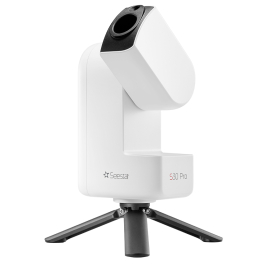
This review is built from ZWO's specifications and user manual, independent reviews in BBC Sky at Night Magazine and Astronomy magazine, and stock checks on October 27, 2026. We have not tested the S50 ourselves.
Is the Seestar S50 worth it?
- Good: a 50mm apochromatic triplet lens (one ED element), a built-in dual-band light-pollution filter, autofocus, GoTo and live stacking in a 2.5 kg (5.5 lb) package that sets up in about ten minutes.
- Not good: a 1920 × 1080 sensor (about 2 megapixels), a narrow 1.29° × 0.73° field that crops large targets, small planets, and dark corner wedges on long sessions in its standard mode.
- Who it suits: beginners and busy people who want pictures of nebulae and galaxies from a suburb or city, with no mount to learn and no laptop.
- Who should skip it: anyone who wants to look through an eyepiece, or who mostly wants detailed views of Jupiter and Saturn.
- Buying one now: a used S50 at a fair price (check it against the S30 Pro's current price), or the new Seestar S30 Pro, which uses the same app.
Seestar S50 specs at a glance
These are ZWO's published figures for the Seestar S50, from its product page and user manual.
| Spec | Seestar S50 |
|---|---|
| Optics | Apochromatic triplet with one ED glass element |
| Aperture / focal length | 50mm / 250mm, f/5 |
| Sensor | Sony IMX462, 1920 × 1080 |
| Field of view | About 1.29° × 0.73° (Astronomy magazine's figure) |
| Filters | UV/IR cut, dual-band light-pollution filter (OIII 30nm / H-alpha 20nm), automatic dark filter |
| Mount | Alt-azimuth GoTo, tracking and plate solving |
| Battery | 6,000 mAh (22.2 Wh), about 6 hours in ZWO's lab estimate |
| Storage | 64 GB, JPEG and FITS files |
| Connections | Wi-Fi (2.4 and 5 GHz, range up to about 10 m), Bluetooth, USB-C |
| Weight / size | 2.5 kg (5.5 lb), 142.5 × 130 × 257mm |
| Tripod thread | 3/8-inch, fits photo tripods with a 3/8-inch stud |
| In the box | Carbon fiber tripod (ZWO's box list; 363mm high per the manual), solar filter, case |
| Recommended temperature | 0 to 40°C (32 to 104°F) |
| Warranty | 2 years from activation; battery 1 year |
ZWO's manual says early units sold the solar filter separately; ZWO's product page lists it in the box. Check that a used unit comes with one.
Can you still buy a Seestar S50?
Not new from the usual places. On October 27, 2026, ZWO's product page said the S50 is out of stock and unavailable, and the top results of an Amazon US search for "Seestar S50" were the Seestar S30 Pro and the DwarfLab Dwarf mini, with no S50 or S50 Pro listing. High Point Scientific listed the S50 as discontinued on October 11, 2026, and ZWO now sells the Seestar S50 Pro.
That leaves three real options. You can buy a used S50, buy the S50 Pro from a telescope dealer, or buy the S30 Pro, which is in stock on Amazon. Our Seestar S50 vs S30 Pro vs S50 Pro comparison goes through the choice spec by spec. The S50 keeps working with the same Seestar app as the newer models, so owners have no reason to replace a working unit.
What the Seestar S50 can see
The S50 is a camera on a computerized mount, so "seeing" means the picture it builds on your screen. It takes many short exposures, lines them up and adds them together (live stacking), so faint objects get brighter and smoother the longer it runs. BBC Sky at Night's reviewer used 20 minutes to an hour of total integration time per target.
- Emission nebulae: the strongest targets. With the dual-band filter switched on, Sky at Night's reviewer reached faint objects such as the Horsehead Nebula from light-polluted sites. Other bright nebulae that fit its frame, such as the Lagoon and the Dumbbell, are good targets too.
- Galaxies: bright ones such as the Whirlpool Galaxy (M51), which Sky at Night's reviewer captured, show their shape and core. The dual-band filter does little for galaxies, so darker skies help more here.
- Star clusters: globular clusters such as M13 in Hercules show as a dense ball of stars, and open clusters fill the frame.
- The Moon: Lunar mode gives a whole-disk picture, since the Moon (about 0.5° wide) fits the frame with room to spare.
- The Sun: with the solar filter fitted, Solar mode shows sunspot groups. Never point it at the Sun without the filter.
- Daytime scenery: Scenery mode works like a long telephoto lens on distant landscapes and wildlife. ZWO compares it to a 1750mm lens.
Which targets fit the S50's frame
The field of view decides how much of an object fits. The S50's frame is about 1.29° by 0.73°, and its 16:9 sensor cannot be rotated, as Astronomy magazine points out. Approximate object sizes below are standard catalog values.
| Target | Approximate size | In the S50's frame |
|---|---|---|
| Andromeda Galaxy (M31) | About 3° long | Cropped, with only the core and inner disk in the frame |
| Pleiades (M45) | About 2° | Cropped at the edges |
| Orion Nebula (M42) | About 1° | Fits, with little room around it |
| Moon and Sun | About 0.5° | Fit with room around them |
| Hercules Cluster (M13) | About 0.3° | Fits well |
| Whirlpool Galaxy (M51) | About 0.2° | Fits, but small in the frame |
| Ring Nebula (M57) | Under 0.03° | A small ring; crop the image to enlarge it |
| Jupiter and Saturn | Under 0.02° | A small disk with little detail |
Want to know more about M31 itself? See what telescope you need to see Andromeda.
What the Seestar S50 can't do
Both magazine reviews praise how easy it is to use, and both name real limits. Know these before you buy.
- Planets come out small. A 250mm focal length is short for planets. Sky at Night's reviewer got a small Jupiter showing only its two main belts. If planets are your goal, a long-focal-length telescope with an eyepiece does far more; see smart telescope vs Dobsonian.
- No eyepiece. You cannot look through a Seestar. Everything you see is on a phone or tablet screen.
- Dark corner wedges. In its standard alt-azimuth mode, the sky slowly rotates in the frame during a long session. Astronomy magazine describes two dark triangles in opposite corners of some images, and Sky at Night noted noisy corners in long stacks; you can crop both. Astronomy magazine notes targets near the celestial equator are less affected. EQ mode fixes this (see below).
- A 2-megapixel sensor. Images are 1920 × 1080. They look good on a phone, but they do not take much cropping or large prints. The S30 Pro and S50 Pro have 3840 × 2160 sensors.
- Short exposures. Astronomy magazine lists 10, 20 or 30 seconds per frame, with 10 seconds as the default.
- Wi-Fi ties up your phone. Connected to the telescope's own hotspot, Sky at Night's reviewer lost phone internet. Station Mode, which joins the telescope to your home Wi-Fi, solves this.
- Cold nights. ZWO recommends 0 to 40°C (32 to 104°F), and its manual warns that battery capacity drops in the cold.
- Sky access. ZWO's manual asks for at least 45° of open sky. A walled yard or a balcony facing one way limits what it can reach.
Who should buy a Seestar S50 (and who shouldn't)
The S50 fits you if:
- you want photos of nebulae and galaxies without learning a mount, a camera and processing software first;
- you live under city or suburban skies, where the dual-band filter helps with nebulae;
- you have short evenings and want results in under an hour, including setup;
- you find a used unit at a fair price, checked against the S30 Pro's current price, with its solar filter and tripod.
Skip it if:
- you want to look through an eyepiece with your own eyes;
- Jupiter and Saturn are your main targets;
- you want large, high-resolution prints (look at the 3840 × 2160 Pro models);
- you want a new unit with a full warranty from a store today, in which case the S30 Pro or the S50 Pro is the better buy.
How to set up the Seestar S50
Setup takes about ten minutes from case to first picture, according to Astronomy magazine. The steps below follow ZWO's user manual.
- Charge it fully first. Use a USB-C charger; the manual says it will not power on if the battery is too low.
- Set up the tripod on firm ground with at least 45° of open sky, spread the legs and screw the S50 onto the 3/8-inch stud. Any photo tripod with a 3/8-inch stud also works.
- Install the free Seestar app on an iPhone, iPad or Android device and allow it Bluetooth, device connection and network access.
- Power on. Hold the power button for 2 seconds. On the very first boot, the manual says to short-press it once, then hold it for 2 seconds. Wait for the voice prompt.
- Connect and activate. Tap Connect in the app, pick your Seestar and, the first time, press the reset button on its base to confirm. The first connection activates the telescope online, so your phone needs mobile data or Wi-Fi for this step. Do not close the app during activation.
- Update the firmware when the app offers it, before your first night out.
- Level it. Adjust the tripod legs until the app's two circles line up. ZWO's manual says under 3° of tilt is acceptable and smaller is better, and that levelling cannot be skipped because GoTo and tracking depend on it.
- Calibrate the compass when the app asks for it. The Madison Astronomical Society's Seestar notes suggest doing it before the final levelling, and repeating it after you change location or update the firmware.
- Pick a target. Choose Stargazing mode, then a target from Tonight's Best or the sky atlas. The S50 slews to it, centers it by plate solving and starts stacking; tap autofocus if the stars look soft.
- Pack up. Slide Power Off in the app or hold the button for 3 seconds, then store it in a clean, dry place.
Start with bright targets. ZWO's manual suggests M31, M42 and the globular cluster 47 Tucanae (from the southern hemisphere); from the US, M42 in winter and M13 in summer are easy first picks.
The Seestar app
The Seestar app is the only way to control the S50; there is no hand controller. It was free on the US App Store on October 11, 2026, and it runs the S50, S30, S30 Pro and S50 Pro. Here is what it does.
- Four modes: Stargazing, Sun, Moon and Scenery.
- Finding targets: a planetarium-style sky atlas, a searchable object database with short descriptions, and Tonight's Best recommendations.
- Imaging controls: autofocus, the light-pollution filter switch (turn it on before you start stacking), exposure length and live stacking that you watch build up.
- Device settings: the dew heater ("lens fog removal"), Wi-Fi details, voice volume, firmware updates and a power-off switch.
- Extras: a weather and Moon-phase panel, image enhancement, and a community feed for sharing pictures.
Files are saved inside the telescope as JPEG and FITS. If you plan to process your own images later in free software such as Siril, Astronomy magazine recommends saving the individual frames, not only the stacked result. For editing basics, see how to edit astrophotography.
Seestar S50 battery life and power
ZWO rates the S50's 6,000 mAh (22.2 Wh) battery at about six hours in its lab, and says runtime drops noticeably with the dew heater on. Astronomy magazine found six hours a fair estimate in cool or mild weather; on cold, damp nights expect less. The battery shuts the telescope down at 5%, and the power light blinks red below 15%.
The fix is external power. The S50 charges through its USB-C port, and Sky at Night's reviewer found a USB power bank gave ample power for a long night. ZWO's manual lists charging support of 5V 2A in normal mode and up to 12V 3A in fast-charge mode. A 20,000 mAh bank with a USB-C Power Delivery port covers a full winter night on top of the internal battery. Hang the bank on the tripod, not the telescope, and leave slack in the cable so the arm can turn.

The battery itself is replaceable. ZWO's manual shows two screws on the base cover, and dealers sell replacement batteries. ZWO's warranty on the battery is one year, against two years for the telescope, so a used S50's battery may be out of warranty.
EQ mode on the Seestar S50
EQ mode tilts the Seestar toward the celestial pole so it tracks the sky the way an equatorial mount does. That removes the field rotation behind the dark corner wedges and allows longer sessions on one target. It needs extra hardware, either ZWO's TH10 tilt head, which fits all four Seestar models, or a third-party wedge that ZWO has not tested, plus a few minutes of polar alignment guided by the app. Our Seestar accessories guide covers the TH10 and where to buy it.
The wedge also moves the telescope's weight off-center, so extend the tripod legs fully and spread them wide. A taller, heavier tripod helps more in EQ mode than in standard mode.

This bundle is for new buyers. If you already own an S50, you only need the TH10 head and a sturdy tripod; you do not need a new telescope for EQ mode.
Accessories worth adding
The S50 ships with what it needs for a first night, including the tripod, the solar filter on later units, a built-in dew heater and built-in filters. Three things are worth adding.
- A USB-C power bank for full nights and cold weather (above).
- A taller tripod. The included tripod reaches 363mm, so fences and roofs can block low targets. Choose a photo tripod with a 3/8-inch stud rated for at least twice the S50's 2.5 kg, about 5 kg (11 lb) or more, with legs that spread wide. Our astrophotography tripod guide explains what to look for.
- The TH10 head if you want EQ mode.
Skip extra dew heaters (one is built in), eyepieces and Barlow lenses (there is no eyepiece port) and memory cards (there is no card slot). The S50 already has its light-pollution filter inside. The full list is in our Seestar accessories guide.
Buying a used Seestar S50: what to check
A used unit is the way to buy an S50 now. Check these points before you pay.
- Price: compare it with the S30 Pro's current price before paying, since the S30 Pro has the sharper sensor, a wider field and a new warranty.
- Solar filter and tripod: make sure both are included, since early units sold the filter separately.
- It connects and updates: ask to see it connect to the Seestar app and install the latest firmware.
- Warranty: ZWO's two-year warranty starts at activation, not at your purchase, and the battery's is one year. The app's Device Info page shows the activation and warranty dates.
- Battery health: ask how old it is and how long it runs on a full charge.
- The front lens: look for scratches or haze; ZWO's manual says to clean it only with optical lens wipes.
Seestar S50 vs the current alternatives
If you cannot find a fair used S50, here is how it compares with the S30 Pro, which was in stock on Amazon on October 27, 2026, and ZWO's newer S50 Pro. Two DwarfLab models, also in stock on Amazon that day, follow the table.
| Spec | Seestar S50 | Seestar S30 Pro | Seestar S50 Pro |
|---|---|---|---|
| Aperture / focal length | 50mm / 250mm | 30mm / 160mm | 50mm / 260mm |
| Sensor | 1920 × 1080 | 3840 × 2160 + wide camera | 3840 × 2160 + wide camera |
| Field of view | 1.29° × 0.73° | 4.6° | 2.8° |
| Weight | 2.5 kg | 1.65 kg | 2.8 kg |
| Storage | 64 GB | 128 GB | 128 GB |
| EQ mode | With TH10 or wedge | With TH10 | With TH10 |
| On Amazon, Oct 27, 2026 | Not found | Yes, ZWO's store | Not found |
Specifications are ZWO's, as listed on our Seestar comparison and best smart telescopes guide.
Seestar S30 Pro: the in-stock Seestar
The S30 Pro trades the S50's 50mm lens for a 30mm one, but its 3840 × 2160 sensor and 4.6° field show the whole Andromeda Galaxy and the Pleiades that the S50 crops, and it weighs 1.65 kg. It uses the same app. Small galaxies look smaller than on the S50, and ZWO's S30 Pro FAQ says it is not optimized for high-magnification planetary imaging either. You can see it on Amazon through the Seestar S30 Pro card above.
Seestar S50 Pro: ZWO's newer 50mm model
The S50 Pro keeps the 50mm aperture and adds a 3840 × 2160 sensor, a second wide-angle camera for framing, a 10,000 mAh battery and 128 GB of storage. It is the closest upgrade for S50 fans who want small targets at a larger scale. It did not appear in an Amazon US search on October 27, 2026, so look for it at telescope dealers.
DwarfLab Dwarf 3: lighter, with three filters

The Dwarf 3 is a Seestar alternative from another maker. It has a 35mm lens with a 150mm focal length and an 8.3 MP sensor, weighs 1.3 kg, about half as much as the S50, and carries visible, astro and dual-band filters. It ships without a tripod, so budget for one with a standard camera thread. Astronomy's review found it too short in focal length for planets, the same limit as the Seestars. Compare them in Seestar vs Dwarf 3 vs Celestron Origin.
DwarfLab Dwarf mini: the lightest option
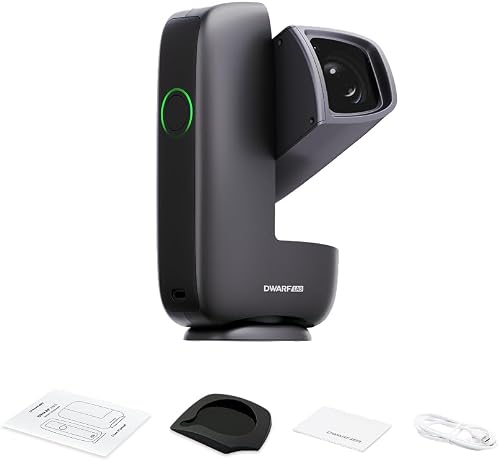
The Dwarf mini has a 1920 × 1080 sensor, the same resolution as the S50, in a body of about 840 g. One published comparison puts its battery life at about four hours, so it suits travel and quick sessions more than long nights on faint targets. Check DwarfLab's listing for what comes in the box.
Frequently asked questions
Is the Seestar S50 discontinued?
ZWO's product page listed the S50 as out of stock and unavailable on October 27, 2026, and High Point Scientific listed it as discontinued on October 11, 2026. ZWO now sells the Seestar S50 Pro, and Amazon US search showed no S50 listing.
Is the Seestar S50 or S30 Pro better?
For a new purchase, the S30 Pro. It has a 3840 × 2160 sensor, a wider 4.6° field, twice the storage and is in stock. The S50 has a larger 50mm lens and a longer focal length, so small targets look bigger, and it is worth buying used at a fair price.
Can the Seestar S50 see planets?
It can photograph them, but they come out small. BBC Sky at Night's reviewer got a small Jupiter showing only its two main cloud belts. A telescope with a long focal length and an eyepiece shows far more planetary detail.
Can you look through a Seestar S50?
No. The S50 has no eyepiece. It is a camera on a computerized mount, and you see the image on a phone or tablet through the Seestar app.
How long does the Seestar S50 battery last?
ZWO rates it at about six hours, less with the dew heater on or in cold weather. It charges through USB-C, so a 20,000 mAh power bank keeps it running all night.
How do I calibrate my Seestar S50?
Level the tripod until the app's two circles line up, under 3° of tilt, then run the compass calibration when the app asks. Repeat the compass calibration after you change location or update the firmware.
How do I change the exposure time on the Seestar S50?
Choose it in the app's imaging settings. Astronomy magazine lists 10, 20 or 30 seconds per frame, with 10 seconds as the default.
Does the Seestar S50 need a subscription?
No. The Seestar app was free on the US App Store on October 11, 2026. ZWO describes its remote access network as a free trial during a beta, with later pricing not announced.
What sensor does the Seestar S50 use?
A Sony IMX462 with 1920 × 1080 pixels, about 2 megapixels, according to ZWO's specifications.
How far can a Seestar S50 see?
Millions of light-years. The Andromeda Galaxy, about 2.5 million light-years away, is an easy target, and reviewers have captured the Whirlpool Galaxy, which is tens of millions of light-years away.