As an Amazon Associate, we earn from qualifying purchases. Check the exact model, condition, delivery and current price before ordering.
- Is the Seestar S30 Pro worth it?
- Seestar S30 Pro specs
- What the Seestar S30 Pro can image
- What the Seestar S30 Pro can't do
- How the S30 Pro differs from the original S30
- Who should buy the S30 Pro, and who should get the S50 Pro or something else
- How to set up the Seestar S30 Pro
- The Seestar app
- Battery life and power
- EQ mode and the TH10 head
- Accessories worth adding (and what to skip)
- Alternatives to the Seestar S30 Pro
- Frequently asked questions
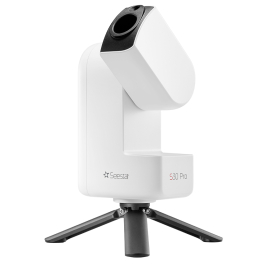
The ZWO Seestar S30 Pro is a 30mm smart telescope that finds, tracks and photographs nebulae, galaxies, star clusters, the Moon and the Sun (with its filter), and builds the picture on your phone. It has a 4K-class main camera with a wide 4.6° field and a second wide-angle camera for the Milky Way, in a 1.65 kg body.
Our verdict: the S30 Pro is a strong first smart telescope for large nebulae, the Andromeda Galaxy and wide star fields, and it is easy to carry. Its small lens is the trade-off, since faint targets need long sessions, small galaxies look small, and planets show almost no detail. On October 28, 2026, it was in stock at ZWO's own store and sold new on Amazon by ZWO's store.
This review is built from ZWO's S30 Pro product page, its January 2026 user manual and its S30 Pro FAQ, independent reviews in BBC Sky at Night Magazine and Fstoppers, and stock checks on October 28, 2026. We have not tested the S30 Pro ourselves, so every observation below names the reviewer or maker it comes from.
Is the Seestar S30 Pro worth it?
- Good: a 4-element apochromatic lens with one ED element, a 3840 × 2160 main camera, a 63° wide-angle camera for the Milky Way and star trails, a built-in dual-band filter, 128 GB of storage and a 6,000 mAh battery, all in 1.65 kg.
- Not good: a 30mm aperture that collects about a third of the light of a 50mm Seestar, tiny planets, and short exposures in its standard mode.
- Who it suits: beginners and travelers who want pictures of big nebulae, the Andromeda Galaxy and the Milky Way without learning a mount, a camera and a laptop first.
- Get the S50 Pro instead if: small galaxies and faint nebulae are your main targets.
- Get something else if: you want to look through an eyepiece, or you mostly want detail on Jupiter and Saturn.
Seestar S30 Pro specs
These are ZWO's published figures for the Seestar S30 Pro, from its product page and user manual (January 2026 edition).
| Spec | Seestar S30 Pro |
|---|---|
| Main (telephoto) lens | 30mm aperture, 160mm focal length, f/5.3, 4-element apochromatic with one ED element |
| Main sensor | Sony IMX585, 3840 × 2160 (8.3 MP) |
| Main field of view | 4.6° (about 4.0° × 2.3° for the 16:9 frame, our calculation) |
| Wide-angle camera | Sony IMX586, 3840 × 2160, 6mm f/1.75, 63° field, autofocus |
| Filters | Built-in UV/IR cut, dual-band light-pollution filter (OIII 30nm / H-alpha 20nm) and dark filter, plus an external magnetic solar filter |
| Mount | Alt-azimuth GoTo with tracking and plate solving; EQ mode with extra hardware |
| Battery | 6,000 mAh (22.2 Wh), about 6 hours in ZWO's lab test |
| Power input | USB-C, 5V/3A |
| Storage | 128 GB (about 110 GB usable, per the manual), JPEG and FITS; video as MP4 or AVI |
| Connections | Wi-Fi 2.4 and 5 GHz (about 10 m), Bluetooth (about 5 m), NFC, USB-C |
| Weight / size | 1.65 kg without tripod, 210 × 140 × 80mm |
| Tripod thread | 3/8"-16 |
| Working temperature | −10 to 40°C (14 to 104°F); charging 0 to 40°C |
| Warranty | 2 years (ZWO product page) |
High Point Scientific's box list for the S30 Pro includes the telescope, the solar filter, a USB-C to USB-A cable, a carrying case and a small tripod. There is no wall charger in that list, so plan to use a USB charger you already own.
What the Seestar S30 Pro can image
The S30 Pro is a camera on a computerized mount, so "seeing" means the picture it builds on your screen. It takes short exposures (10 seconds by default, per ZWO's manual), aligns them and adds them together, so faint objects get brighter and smoother the longer it runs. BBC Sky at Night's reviewer imaged 12 clusters, 15 nebulae and nine galaxies with it from a Bortle 4 site, a rural-to-suburban sky.
- Large nebulae: its best targets. The wide field fits the whole Orion Nebula with its surroundings, the North America Nebula and the Rosette. Fstoppers' reviewer shows a 20-minute exposure of the Horsehead Nebula region.
- Big galaxies: the Andromeda Galaxy fits in one frame, with no mosaic needed. Fstoppers' reviewer needed about three to four hours on Andromeda for a clear result, which shows what a 30mm lens asks of you.
- Star clusters: the Pleiades and the Double Cluster fit with room to spare; Sky at Night's reviewer notes the 4.6° field takes in large clusters without mosaics.
- The Milky Way and star trails: the 63° wide-angle camera handles these. The original S30 and S50 have no Milky Way mode; ZWO's S50 Pro page lists Milky Way and star-trail modes for the S50 Pro too. Sky at Night's reviewer found its star-trail images showed "excellent clarity and star colour".
- The Moon and the Sun: both fit easily. Solar System mode offers 1x, 2x and 4x views, which crop the frame and lower the resolution, according to the manual. Never point it at the Sun without the magnetic solar filter fitted.
- Daytime scenery: Scenery mode works as a long lens for distant landscapes and birds.
Which targets fit the S30 Pro's frame
ZWO lists the main field as 4.6°. For a 16:9 frame measured across the diagonal, that works out to about 4.0° by 2.3°. Object sizes below are approximate standard catalog values.
| Target | Approximate size | In the S30 Pro's frame |
|---|---|---|
| Veil Nebula complex | About 3° | Most of it fits; ZWO's manual calls it very difficult and says it needs very dark skies |
| Andromeda Galaxy (M31) | About 3° long | Fits whole, with room around it |
| Pleiades (M45), North America Nebula | About 2° | Fit whole |
| Rosette Nebula, Lagoon Nebula (M8) | About 1.3° | Fit, with plenty of star field around them |
| Orion Nebula (M42) | About 1° | Fits with its surroundings |
| Moon and Sun | About 0.5° | Fit easily, but fill only part of the frame |
| Hercules Cluster (M13) | About 0.3° | Small; crop the image |
| Whirlpool Galaxy (M51) | About 0.2° | Small, with little detail in the arms |
| Ring Nebula (M57) | Under 0.03° | A tiny ring |
| Jupiter and Saturn | Under 0.02° | A small disk or dot |
For a first night, ZWO's manual suggests bright targets such as M31, M42 and the globular cluster 47 Tucanae (from the southern hemisphere). More on Andromeda is in what telescope you need to see Andromeda.
What the Seestar S30 Pro can't do
Both independent reviews like how easy it is, and both name real limits. These are the ones to weigh before you buy.
- A small lens means long sessions. A 30mm aperture collects about 36% of the light of a 50mm one. Bright targets show up within minutes, but faint ones take hours of stacking for a clean picture, as the Fstoppers times above show.
- Planets are tiny. ZWO's FAQ says you can capture planets but that the S30 Pro "is not a dedicated planetary photography system". Sky at Night's reviewer found planets "too small to show any detail", though Jupiter's four large moons showed. If planets are your goal, see our telescopes for viewing planets.
- Light pollution still costs you. The dual-band filter helps emission nebulae such as Orion and the North America Nebula. It does little for galaxies and star clusters, and ZWO's own manual says strong light pollution can still greatly affect your images. ZWO's FAQ says it performs well under suburban skies; darker skies still give better results.
- Short exposures in standard mode. On its own tripod the S30 Pro runs in alt-azimuth mode, and the manual says exposures are typically limited to about 30 seconds before field rotation softens detail. EQ mode allows up to 60 seconds but needs extra hardware (see below).
- A sealed unit. ZWO's FAQ says external filters, reducers and camera upgrades are not supported. The built-in filters and the solar filter are what you get.
- No eyepiece. You cannot look through it. Everything appears on a phone or tablet screen.
- Short wireless range. Wi-Fi reaches about 10 m and Bluetooth about 5 m in ZWO's open-air tests, and Fstoppers' reviewer called those short ranges the main annoyance.
- Some rough edges. Sky at Night's reviewer had a USB port that "became loose within a couple of months", and found that changing the framing can leave black lines around the edges of the frame.
How the S30 Pro differs from the original S30
The S30 Pro is the upgraded version of ZWO's original 30mm Seestar S30. The biggest changes are the cameras. ZWO's S30 manual lists a Sony IMX662 main sensor at 1920 × 1080 with a 2.46° field and 64 GB of storage. The S30 Pro moves to a 3840 × 2160 main sensor, a 4.6° field, 128 GB, and a 4K wide-angle camera, and its focal length grows slightly, from 150mm to 160mm.
ZWO's FAQ lists a new Milky Way mode and higher-resolution video as upgrades over the S30 and S50. On October 28, 2026, ZWO's old S30 product address opened the S30 Pro page, and ZWO's site listed the original Seestar S30 as out of stock. If you already own an S30, it keeps working with the same app.
Who should buy the S30 Pro, and who should get the S50 Pro or something else
The S30 Pro fits you if:
- you want color pictures of big nebulae, Andromeda and star fields from your first night, with setup in minutes;
- you travel, hike or fly to dark skies and want a light kit (1.65 kg plus a small tripod);
- you want Milky Way and star-trail photos as well as deep-sky targets, from one device;
- you are happy to let it stack for an hour or more on faint targets.
Get the Seestar S50 Pro instead if small galaxies and faint nebulae matter most. Its 50mm, 260mm lens shows small targets larger, and ZWO's own S50 Pro FAQ says that if you want fainter deep-sky objects and more detail, "the S50 Pro is the better upgrade". It weighs 2.8 kg against 1.65 kg. An Amazon US search on October 28, 2026 showed no S50 Pro listing in its top results, so look for it at ZWO's store or a telescope dealer.
Consider a used original Seestar S50 only if the price is right. On October 28, 2026, ZWO's S50 page said it is "currently out of stock and unavailable". It has a 50mm lens but a 1920 × 1080 sensor and a narrower field. Our Seestar S50 review covers what it sees and what to check on a used unit, and the Seestar S50 vs S30 Pro vs S50 Pro comparison sets the three side by side.
Get something else if you want to look through an eyepiece or want planetary detail. A traditional telescope does both better; see smart telescope vs Dobsonian.
How to set up the Seestar S30 Pro
Fstoppers' reviewer had calibration done in about two minutes, and Sky at Night's reviewer says a complete beginner can be imaging within minutes in alt-azimuth mode. These steps follow ZWO's user manual.
- Charge it first. Connect the supplied USB-C cable and charge for at least 4 hours, or until all four battery lights are solid.
- Install the free Seestar app on a phone or tablet and allow Bluetooth, device connection and network access.
- Place it on a flat, level surface or a tripod with at least 45° of open sky. Keep it in alt-azimuth mode for the first session, as the manual advises, and face the logo side north.
- Power on. Hold the power button for 2 seconds; on the very first boot, short-press it once and then hold it for 2 seconds.
- Connect. Stand within about 10 feet and tap Connect in the app. The first time, press the reset button under the telescope when the app asks. Android phones may need you to join the telescope's Wi-Fi hotspot by hand, as the manual explains.
- Activate it online. The first connection activates the telescope, so your phone needs mobile data or Wi-Fi for this step. Do not close the app while it runs. After that, the telescope's own hotspot works with no cell signal.
- Update the firmware when the app offers it, and wait for the automatic reboot.
- Pick a target. Open Stargazing mode and choose from Tonight's Best, a category or the Sky Atlas, then tap GoTo. It slews, plate-solves until the target is centered and starts stacking. You can leave the app, and it keeps imaging.
- Save and export. Tap Stop when the picture looks good, then open the album and the Seestar tab to save it to your phone.
- Shut down. Use the swipe-to-shut-down switch on the app's My page, or hold the power button for 3 seconds. After the first activation, phones with NFC can reconnect by touching the telescope.
The Seestar app
You control the S30 Pro from the Seestar app on a phone or tablet. ZWO's FAQ says there is no Windows PC app, though the telescope supports ASCOM Alpaca, so software such as NINA can run it (see below). The app was free on the US App Store on October 28, 2026, with no in-app purchases listed, and its listing says it works with all Seestar models. Here is what ZWO lists for the S30 Pro.
- Modes: Stargazing (main lens), Milky Way and star trails (wide lens), Solar System for the Sun, Moon and planets, and Scenery for daytime use.
- Mosaics: one-tap 8K stitching of deep-sky mosaics and of horizontal or vertical Milky Way panoramas.
- Finding targets: a sky atlas, constellation recognition, Tonight's Best picks and a database of more than 80,000 deep-sky objects.
- Planning: Plan Mode schedules a night's targets so it can run on its own.
- Processing: one-tap noise reduction and background-gradient removal, plus a "Freeze the Ground" option that keeps the foreground sharp in wide-angle sky shots.
- Remote and third-party control: ZWO's Telescope Network for remote control, and ASCOM Alpaca support, so astronomy software such as NINA can run it.
- Station Mode: joins the telescope to your home Wi-Fi, so your phone keeps its internet connection.
To process images yourself, ZWO's FAQ says the S30 Pro can save individual FITS subframes as well as the stacked image. Sky at Night's reviewer found the raw frames very dark and had to raise brightness before one desktop stacking program would accept them. For the basics, see how to edit astrophotography.
Battery life and power
ZWO rates the 6,000 mAh (22.2 Wh) battery at about six hours in stargazing mode, measured at 25°C with the dew heater off. Recording video from both cameras cuts that to about four hours, per the manual, and cold nights or the heater cut it further. Below 5% charge, the telescope parks its lens and shuts down.
It can run while charging through USB-C, and ZWO's manual suggests a USB power bank for longer nights. ZWO lists the input as 5V/3A, so pick a bank with a USB-C port that can supply that. About 20,000 mAh covers a long winter night on top of the internal battery. Hang the bank on the tripod, not the telescope, and leave slack in the cable so the arm can turn, as the manual advises.

Flying with it is possible. ZWO's FAQ says the 22 Wh battery meets the usual standards and that, in ZWO's experience, it can be carried in your luggage, though some airlines may ask you to remove the battery if you check it in. Ask your airline before you fly.
EQ mode and the TH10 head
EQ mode tilts the Seestar toward the celestial pole so it follows the sky the way an equatorial mount does. That cuts field rotation and allows exposures of up to 60 seconds, which ZWO's manual says gives more light and clarity on most objects. ZWO's FAQ says that without its TH10 head, EQ mode cannot be enabled on the S30 Pro, and it recommends the TH10 with the TC20 tripod for a more stable setup. You then polar-align with the app's guidance, aiming for errors under 1°.
ZWO's manual suggests starting EQ mode at 20 to 30 seconds per frame and moving to 45 to 60 seconds once stars stay round. It does not recommend EQ mode for your first session. If you are buying new and already know you want EQ mode, ZWO's bundle saves assembling the parts yourself.

Already own an S30 Pro? You only need the head and a solid tripod, not a new telescope. ZWO sells the TH10 with its TC20 tripod as a kit, and the TH10 alone for owners who already have a sturdy photo tripod. The TH10 weighs 411 g and carries up to 5 kg, according to ZWO's Amazon listing.

Accessories worth adding (and what to skip)
The S30 Pro ships with what a first night needs, including a small tripod, the solar filter, a case and a built-in dew heater. Three additions are worth it for many owners.
- A USB-C power bank for full nights and cold weather (above).
- A taller tripod. The included tripod is a small tabletop model, and Sky at Night's reviewer suggests a higher one if fences or buildings surround your yard. Any photo tripod with a 3/8"-16 stud fits. Choose one rated well above the telescope's 1.65 kg, with legs that spread wide; our astrophotography tripod guide explains what to look for.
- The TH10 head if you want EQ mode and longer exposures.

Skip extra light-pollution or color filters, because ZWO's FAQ says external filters are not supported and the dual-band filter is already inside. Skip dew heaters (one is built in), eyepieces and Barlow lenses (there is no eyepiece port) and memory cards (storage is internal). Cases from other makers are sold on Amazon, but the S30 Pro already comes with one. The full list is in our Seestar accessories guide.
Alternatives to the Seestar S30 Pro
Here is how the S30 Pro compares with ZWO's 50mm models and DwarfLab's Dwarf 3, using each maker's own figures. The original S50 is listed for owners and used buyers.
| Spec | Seestar S30 Pro | Seestar S50 Pro | Seestar S50 | Dwarf 3 |
|---|---|---|---|---|
| Aperture / focal length | 30mm / 160mm | 50mm / 260mm | 50mm / 250mm | Not listed / 737mm equivalent |
| Main sensor | 3840 × 2160 | 3840 × 2160 | 1920 × 1080 | 8.3 MP |
| Field of view | 4.6° | 2.8° | About 1.29° × 0.73° | 3° |
| Wide-angle camera | Yes, 63° | Yes, 63° | No | Yes |
| Weight | 1.65 kg | 2.8 kg | 2.5 kg | About 1.35 kg |
| Battery (maker's figure) | About 6 h | Up to 9 h | About 6 h | Up to 5.5 h |
| EQ mode | With TH10 | With TH10 | With TH10 or wedge | Yes |
| Tripod in the box | Yes, small | Yes | Yes | No |
Figures come from ZWO's S30 Pro and S50 Pro product pages, our S50 review for the original S50, and DwarfLab's Dwarf 3 page, all read October 27 or 28, 2026.
Seestar S50 Pro: more detail on small targets
The S50 Pro has the same 3840 × 2160 main resolution (from a different sensor, an OmniVision OS08B10, per ZWO) and the same 63° wide-angle field, and adds a 50mm, 260mm lens, a 10,000 mAh battery and a two-section tripod. ZWO's own FAQ describes the S30 Pro as "a portable all-rounder" and the S50 Pro as built for deep-sky imaging with "richer image detail". It weighs about 1.15 kg more and did not appear in an Amazon US search on October 28, 2026.
DwarfLab Dwarf 3: three filters and EQ mode on your own tripod
The Dwarf 3 is a smart telescope from another maker. DwarfLab lists an 8.3 MP main sensor, a 3° field, about 1.35 kg, up to 5.5 hours of battery and three built-in filters (visible, astro and dual-band), with an equatorial mode that removes field rotation. It ships without a tripod. It is a close match for travel, so the choice comes down to filters and EQ mode against the S30 Pro's wider field and included tripod.

For more brands, including Vaonis and Celestron's Origin, see our best smart telescopes guide and Seestar vs Dwarf 3 vs Celestron Origin.
Frequently asked questions
Is the Seestar S30 Pro any good?
Yes, for wide deep-sky targets. BBC Sky at Night's reviewer imaged 12 clusters, 15 nebulae and nine galaxies with it, and its 4.6° field fits the Andromeda Galaxy and the Pleiades whole. Its 30mm lens needs long sessions on faint targets, and planets come out small.
Can the Seestar S30 Pro see planets?
It can photograph them, but they look small. ZWO's FAQ says it is not a dedicated planetary system, and Sky at Night's reviewer found planets too small to show any detail, though Jupiter's large moons showed. A telescope with a long focal length and an eyepiece does far more.
How far can the Seestar S30 Pro see?
Millions of light-years. The Andromeda Galaxy, about 2.5 million light-years away, fits whole in its frame, and Sky at Night's reviewer imaged nine galaxies. Faint, distant galaxies need hours of stacking with a 30mm lens.
What filters does the Seestar S30 Pro have?
It has three built-in filters, a UV/IR-cut filter, a dual-band light-pollution filter (OIII 30nm and H-alpha 20nm) and a dark filter, plus a magnetic solar filter in the box. ZWO's FAQ says external filters are not supported.
What is the difference between the Seestar S30 and the S30 Pro?
The S30 Pro has a 3840 × 2160 main sensor instead of 1920 × 1080, a wider 4.6° field instead of 2.46°, 128 GB instead of 64 GB, a 4K wide-angle camera, and a Milky Way mode the original S30 does not have.
Do I need the TH10 for the S30 Pro?
Only for EQ mode. ZWO's FAQ says EQ mode cannot be enabled on the S30 Pro without the TH10, and recommends pairing it with the TC20 tripod. In standard alt-azimuth mode, it works on its own tripod.
Does the Seestar S30 Pro work in a city?
Yes, with limits. Its dual-band filter helps with emission nebulae such as Orion, and ZWO says it performs well under suburban skies, but its manual warns strong light pollution can still greatly affect images, and galaxies gain little from the filter.
How do I get files off the Seestar S30 Pro?
Save images to your phone from the app's album, or connect the telescope to a computer with the USB-C cable. ZWO's FAQ says it can save individual FITS frames for your own processing as well as the stacked picture.
Does the Seestar S30 Pro need a subscription?
No. The Seestar app was free on the US App Store on October 28, 2026, with no in-app purchases listed. ZWO describes Telescope Network remote access as a limited-time free trial during its beta, with later pricing not announced.